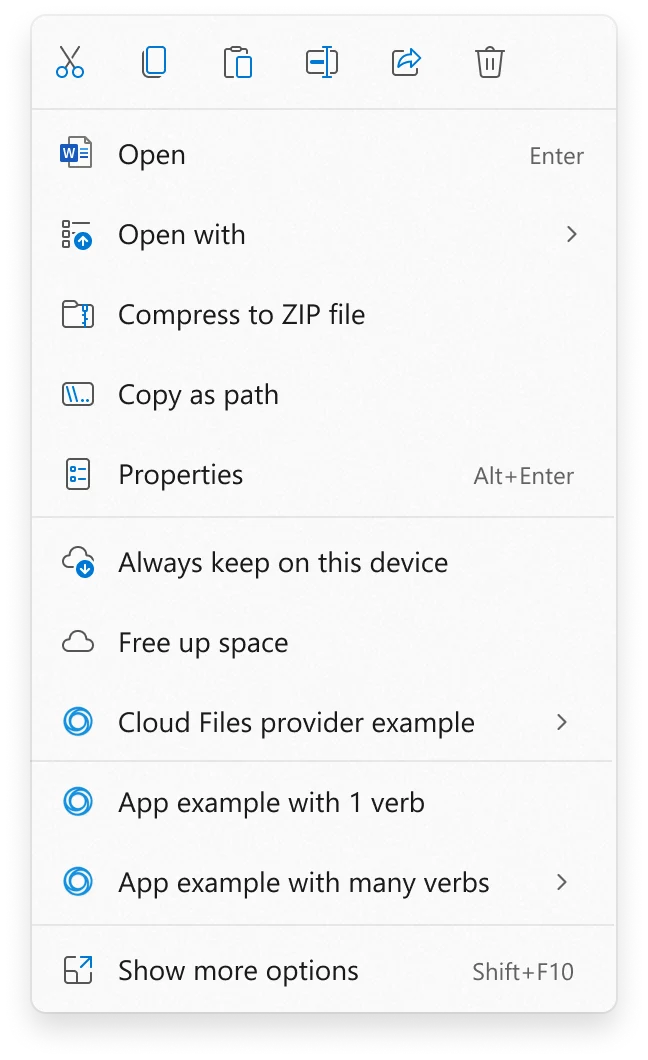
The release of preview update KB5127936 marks a significant pivot in Microsoft’s design philosophy for its flagship operating system. For years, power users have voiced persistent frustrations regarding the Windows 11 context menu, which fundamentally altered long-standing user interface conventions. By restricting the primary right-click menu to a simplified icon-based layout and relegating essential commands to a secondary "Show more options" submenu, Microsoft inadvertently disrupted the muscle memory of millions of professionals and developers. This update, which applies to Windows 11 versions 26H2 and 25H2, introduces a long-awaited "customize menu" feature, allowing users to reclaim control over their workflow by toggling, rearranging, and configuring the commands that appear in their right-click interface.
The Evolution of the Context Menu: A Historical Perspective
The Windows context menu—often referred to as the right-click menu—has been a cornerstone of the Windows experience since the introduction of Windows 95. For nearly three decades, it served as the primary bridge between user intent and system action. However, when Windows 11 launched in 2021, Microsoft introduced a streamlined, "modern" context menu that prioritized aesthetics and reduced clutter.
While the goal was to create a more touch-friendly and visually cohesive environment, the transition was met with immediate backlash. The removal of traditional commands like "Refresh," "Properties," and various third-party shell extensions from the top-level view forced users to interact with the OS in a multi-step process. This created a friction point that necessitated the use of third-party registry hacks, custom scripts, and community-developed utilities to restore the classic menu functionality. The decision to finally integrate this customization natively suggests a formal acknowledgement by Microsoft that "one-size-fits-all" design choices do not always align with the requirements of productivity-focused power users.
Technical Details of the KB5127936 Update
The KB5127936 update is being deployed as a cumulative patch, indicating that it includes not only the new context menu configurations but also a suite of underlying system refinements. The rollout is currently in a gradual deployment phase, a standard practice for Microsoft to monitor for stability issues before reaching general availability.
The new "Customize Menu" interface allows for a high degree of granularity. Users can:
- Toggle Native Commands: Items such as "Send To," "Create Shortcut," and "Open in Terminal" can be toggled on or off based on individual preference.
- Rearrange Layout: The order of items in the primary menu can now be adjusted to prioritize frequently used actions.
- Third-Party Extension Control: Developers and users can now specify whether third-party shell extensions appear in the main context menu or are relegated to the "Show more options" submenu, providing a cleaner look while maintaining the extensibility that makes Windows a robust platform.
Financial Context and Market Strategy
The timing of this update is particularly noteworthy. It coincides with Microsoft’s latest quarterly financial report, which revealed a continued deceleration in the Windows OEM (Original Equipment Manufacturer) sector. As the demand for new PCs softens, Microsoft is under increasing pressure to ensure that the existing Windows 11 install base remains satisfied and engaged.
Industry analysts suggest that by responding to long-standing user grievances, Microsoft is attempting to bolster retention and reduce the incentive for users to migrate to alternative operating systems or hold onto older, unsupported versions of Windows. The declining revenue from Windows licenses—driven by longer PC upgrade cycles—means that the "Services and Subscriptions" aspect of the Windows ecosystem must be anchored by a high-quality user experience. Prioritizing developer and power-user sentiment is a strategic move to maintain the platform’s relevance in a competitive market.
Introducing Cloud Rebuild: A New Era for System Recovery
Beyond the context menu, the KB5127936 update introduces a powerful recovery feature dubbed "Cloud Rebuild." This tool represents a significant advancement in how Windows handles catastrophic system failures. Traditionally, if a Windows installation failed to boot, users were required to rely on local recovery partitions, physical installation media, or complex command-line repair tools.
Cloud Rebuild automates this process by pulling a fresh, official Windows 11 image—complete with necessary system drivers—directly from the Windows Update servers. This ensures that the system is restored to a clean, stable state without the need for external hardware.
It is vital to distinguish between "repair" and "rebuild" in this context. Microsoft has clarified that Cloud Rebuild acts as a clean installation. It does not perform an "in-place upgrade" or a "system refresh" that preserves user applications; rather, it wipes the system partition to provide a baseline environment. For security-conscious users, the tool also includes an option to fully sanitize the system drive, ensuring that sensitive data is effectively neutralized before the new image is deployed. This is a significant boon for IT administrators and enterprise environments, where rapid deployment and secure device sanitization are operational imperatives.
Impact on the Windows Ecosystem
The inclusion of these features—specifically the context menu customization and Cloud Rebuild—highlights a broader trend within Microsoft’s Windows engineering team: the shift toward a more modular and user-definable operating system. For years, the criticism against Windows 11 was that it prioritized form over function. By allowing users to customize the UI and providing more robust, cloud-native recovery tools, Microsoft is signaling a return to the flexibility that defined the Windows XP and Windows 7 eras.
However, the implications go deeper than just UI preferences. By allowing developers to better control how their software integrates with the system shell, Microsoft is fostering a more stable software ecosystem. When developers are forced to "hack" their way into the right-click menu, it often leads to instability and system crashes. Providing a native, documented way to manage these extensions is a clear win for both the end-user and the developer community.
Future Outlook and Next Steps
As the update moves from preview to general availability, Microsoft will likely collect telemetry data to see how users utilize these new customization tools. If the update proves successful in curbing user dissatisfaction, it may serve as a blueprint for how the company handles future UI changes.
For the average user, the takeaway is clear: Microsoft is listening, albeit slowly, to the core requirements of its user base. The shift toward a more transparent and configurable Windows 11 is a direct response to the reality that the modern PC user is more sophisticated and demanding than ever before. Whether these changes will be enough to reverse the trends seen in the latest quarterly financial reports remains to be seen, but the move is undoubtedly a step toward re-establishing the trust of the power-user community.
Users interested in exploring the full breadth of these changes, which also include updates to Xbox-related performance modes and various settings menu optimizations, are encouraged to consult the official documentation provided by Microsoft’s release notes for KB5127936. As the rollout continues over the coming weeks, Windows 11 users should expect a more stable, personalized, and resilient operating system experience. This update serves as a reminder that even in the age of cloud-first computing, the fundamentals of the user interface and the reliability of system recovery remain the bedrock of a successful desktop platform. The path forward for Windows 11 will likely continue to balance the push for a modern aesthetic with the practical, functional needs of a global user base that relies on the operating system for its daily professional and personal productivity.